Selasa, 29 Maret 2016

How To Register Cheap Domain From Godaddy

0

Now everyone wants to register cheap domain in Pakistan but it is not a difficult now after reading this article. Domain is address of your website, which used to lead visitor to your website. There are lot of free cu.cc, as.cc and .tk names available in world but visitors and search engines does not pay value to these names due to their lack of authenticity, and WHOIS information so you must have .com, .net, and any other similar domain extension to grab visitors for your website and also make suitable and proper presence in search results of Google and other search engines. When we specifically talk about Pakistan then we come to know that .com and .pk are respectively most popular domain extensions in Pakistan and many national and international name providers register thousands of domain names for Pakistan. Average price of .com is 11.5$ which is equal to Rs: 1170 Pkr but you will shocked to know that now you can get your .com for RS: 333 Pkr per year in Pakistan and this very exclusive promotional offer is available by world renowned domain provider Godaddy.com for Pakistani users.

How to register domain in RS: 333pkr on Godaddy.com
    Cheap Domain
  1. Visit http://pk.godaddy.com
  2. Enter your desired domain name.
  3. Proceed to check out and fill in your required details
  4. Create new account(if old customer than enter your client username and password)
  5. Enter your credit card details and click checkout
  6. Visit  your email box and checkout godaddy confirmation email
  7. Note down your cpanel username, password, and address
  8. Enjoy the party!
Offer Limitations, terms, and conditions
1: Discounts cannot be used with conjunction of any other promotion or offer
2: This offer is exclusively available for selected territory as per Godaddy rules and regulations
3: You can redeem this offer by credit card, Ali pay, or gift vouchers
4: This offer is available on registration of only one domain for one year
5: Godaddy reserves the right to change terms and conditions as per its requirement without issuing any notice or warning

Benefits of registering domain in RS: 313PKR
It is very difficult and almost impossible to find out offer in 313pkr rupees because all international and local service providers have an least packages of more than one thousand rupees. Godaddy has very good customer support, provide fantastic features, and domain lookup to protect security of its customers on internet. It is almost free to get registration at such an low price in Pakistan where price of dollar is going high day by day and Godaddy offer this cheap domain in very less Pakistani rupees price which is affordable for bloggers, students and all other professionals. Now, you can get benefit from this magical offer mentioned above without using any coupon code and grab your .com in very less price in Pakistan.

Read more

Top Five Online Stores to Buy Books

0

Ereaders are very popular these days. There are many popular and specific sites and stores which are good way to buy books easier. There are amazing online bookstores with cheap and low prices which attract the people more. And you can find amazing bargains online. There are heaps of websites and bookstores which are fabulous.

Amazon Kindle Store:
Amazon is one of the best online book store which has no competitors. Kindle is the best seller online. It offers wealth of new release many of them are completely free. Many magazines, Maps, eBooks, blogs and mountain of books are available in this store. This is the most powerful book store around. They are not concerned about their competitors. It built up its efficiency and low costs. Even it has benefit of mobile apps for ios, Android, Mac windows and many more books. This is the best seller for shopping of books on the internet. Collectively it has low prices and has a fantastic range.

Google eBooks:
Google eBook stores not important or attributed like Amazon or Barnes because it has no hardware reader directly but Google will fix this problem with the launching of the Iriver Story HD. Google also offer apps for web access to their growing catalog of literature. Google eBook store is also making partners and libraries for book purchasing and borrowing.
Online Stores


Nobel Nook and Barners Book Store:
This is the world’s greatest online bookstore. This is the best brand of books for shopping. It is developed by the America. This is all based upon Android. This is capable for different devices like wi-fi 3G WIRELESS. BARNES AND Nobel Nook eclipsed the Kindle recently because of most purchased ereader. The Nook store sports over 2 million books which are included best seller which also offer host of apps.

Kobo Books:
The service of this book store is impressive. It is not like other competitors like Amazon Kindle Store but you not have to lock specific device. Kobo also offers apps for Blackberry, Android. With help of this you also can download eBooks in Pub and pdf format.  So this ebook is more profitable.

Project Gutenberg:
In the competition of many other online stores. This book store is still strong in services. Its catalog eclipsed by many other competitors and it still going strong for literature books in the public domain. The service  has over 3600 completely free and DRM free. It can be read on multiple devices and it can be chosen the file format which works best.

Conclusion:
These are the best online book sellers which are not comparable and this can add greatest value in buying books online with low prices.

Read more

How to know when your beauty products expire

0


DOES YOUR MAKEUP HAVE A SHELF LIFE? HOW TO KNOW WHEN YOUR BEAUTY PRODUCTS EXPIRE

We know how much you love that perfect pink lipstick. Or the eyeliner thats been sharpened down to no more than a nub. But there comes a point when you have to let go and accept the reality that your favorite beauty products eventually become breeding grounds for bacteria. Heres how to know whats still good and whats past its prime.

Read full story....

Read more

How to set up a Payoneer account and get 25 for Free

0

Payoneer is the best choice to withdraw money from PayPal in unsupported countries like Pakistan, Egypt, and Iran etc. Many people also use Payoneer to verify PayPal account with their US payment service.

What is Payoneer MasterCard?

Payoneer MasterCard works just like any other prepaid MasterCard card. The card is accepted at all locations worldwide, where Debit MasterCard is accepted. You can use it at a point of sale location to make purchases and at an ATM to withdraw cash. Sign up now and  you will receive  25$ 

What is a Payoneer?

Payoneer is an online global payments company that provides easy solution to make online payments, send and receive money from over 200 countries and also from US companies including PayPal, Amazon, and Facebook etc.  Using Payoneer Master Card, you can withdraw your funds from anywhere in the world through MasterCard supported ATM machine.

Here some of the main features:
  • Purchase online and in-store or withdraw cash at ATMs worldwide with your personal Prepaid Mastercard
  • Withdraw funds directly to your local bank account
  • Withdraw funds directly to your local eWallet
  • Payments available within 2 hours
  • 24/7 online ‘My Account’ page for checking balances and transactions
  • send and receive money from over 200 countries and also from US companies

There also an offer. Sign up now and  you will receive  25$ 

Payoneer is a popular payment solution which makes sending/receiving payments seamless. Widely popular in non-US countries, Payoneer targets a huge market of freelancers, professionals and entrepreneurs who offer their services online.

When you signup for Payoneer, theyll give you a free virtual US bank account number (most probably Bank of America) and a free MasterCard prepaid debit card (shipped to your location) as well. In short, you can provide your virtual account number and the routing number to any US company to receive funds via US Payment Service (ACH).

Companies like Upwork, Teespring, Freelancer, Airbnb, Google etc offer Payoneer as a payment solution to transfer funds. (Remember, if your US company doesnt use ACH for funds transfer you wont be able to receive money)


When you signup for a partner company through Payoneer, youll be offered two different methods to receive funds:

1- Direct deposit to your local bank account
2- Direct funds transfer to your prepaid card.

With your free MasterCard, youd be able to withdraw cash from MasterCard/Cirrus/Maestro ATMs, shop online, pay at restaurants, pos terminals and gas stations.
No matter where you are in the world!

How to set up a Payoneer account?

1) Go to Payoneer Signup Page and Click Signup button.

Note#: Youll earn 25$ for Free as a Signup Bonus.

<<Click Here to Get a Free Payoneer MasterCard with 25$ Bonus!>>

 How to Get a Free US Bank Account


Step 2:
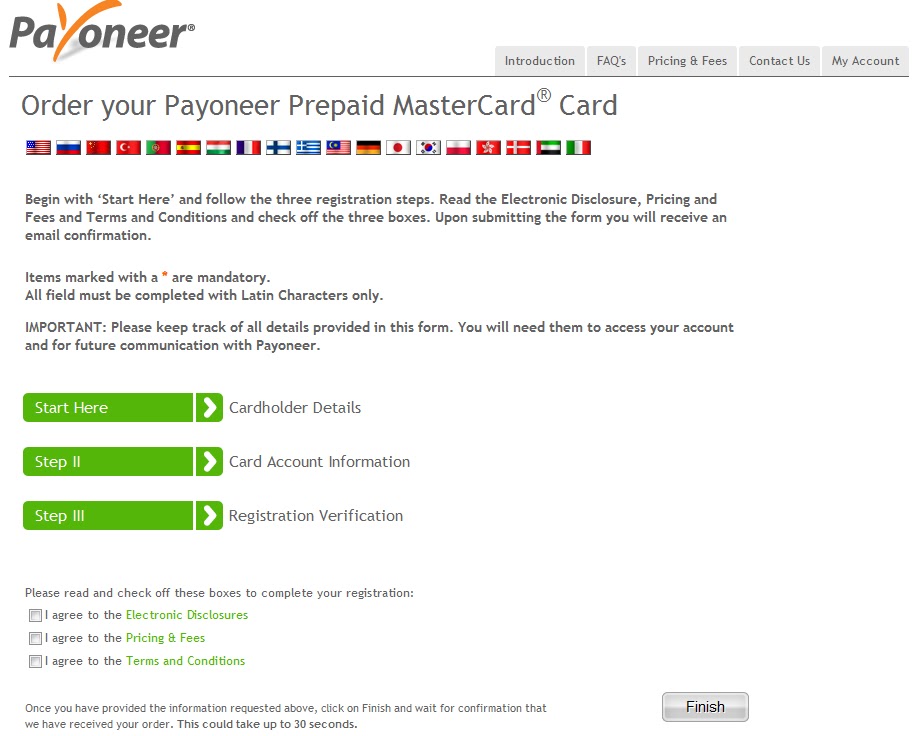
Click Start Here button and fill up the CardHolder details

set up for Free Payoneer MasterCard


Step 3:

In this stage you need to provide valid information. You need to provide First name, Last name, E-mail Address and Date of Birth. Be careful about information, you must provide all information according to your Government ID card or Passport or Driving License.
Provide your contact address properly and clearly so that you will get the MasterCard easily.

How to set up a Payoneer account?


Step 4:

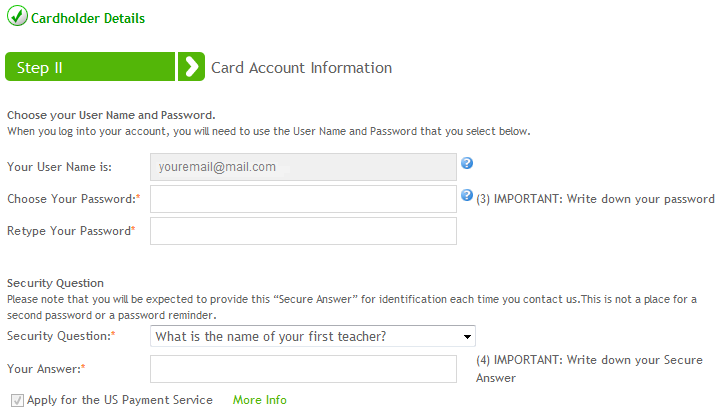
In this section , you need to provide security details (Security Question and Answer) and Passowrd ensure you use letters and numbers in order to make the password strong. Click Next and Confirm your Registration.

How to Get a Free US Bank Account

Step 5:
In this section you’ll be requested to provide an ID card. You can use a passport, a national ID or drivers license. Just input the number of your card into the space provided.


Step 6:
Check the 3 Agree buttons and click Finish.


Step 7:
Check your email that is registered before, youll get an email from Payoneer Customer Support that contains your submission that the application is currently in review.

<<Click Here to Get a Free Payoneer MasterCard with 25$ Bonus!>>

 How to get payoneer card with $25 bonus

The Payoneer Refer A Friend  program is a great way to earn extra cash simply by telling your friends about Payoneer.

Payoneer allow you to get paid to refer your friends. You both earn $25 when the referred member accumulate $100 in transactions using his new card. You get paid your $25 for free sign up here.

You will get an email from Payoneer whenever someone signup for Payoneer MasterCard with your affiliate link. Again you will receive an email when your referral loads total payment of 100$ to his/her account and you will see 25$ bonus in your account. Your referral will also earn 25$ bonus along with you after loading amount of 100$.If you do not have a Payoneer account then follow the below link to signup and earn your 25$ reward.

Click here to Register for Payoneer 


If you enjoyed the article please share to others who may find it useful


Read more

Creating and selling wallpaper made by public domain images

0


Creating and selling wallpaper made by public domain images

 "wallpaper are like our best friend,We want them at our desktop,mobile,screen,iPhone,and also at our iPhone and blackberry cases."


From the upper lines you all come to know that selling wallpaper is profitable task and you can make massive income with them.
Creating and selling wallpaper made by public domain images

Is selling wallpaper is really profitable task


Yes You can take a look at million of sites like shutter stock they are making money with wallpaper Because this work gives max result in little effort.


Creating wallpaper from public domain images is really profitable.You just have to show simple creativity and you can sell million of hot selling wallpaper.I make tons of wallpaper from NASA public domain images and you can do the same just download NASA images or public domain images from here and start creating.


Uniqueness
Include some uniqueness in this images just dont copy paste as it is.Do some editing and then place them on the web.


This is a little effort work you can do it with ease and can make more money online.

Read more

How to Make Money for College Students Online

0


How to Make Money for College Students Online


Powered by Blogger